Choosing a voice assistant for a smart home is less about which one can turn on a light and more about which one can reliably connect the devices, services, and people in your household. Amazon Alexa and Google Assistant both handle common commands, routines, and compatible smart devices, but they have different strengths: Alexa generally offers broader device choice and customization, while Google Assistant fits more naturally into Google services and Android phones.

Get home appliances delivered free with Prime
- Fast, free delivery on millions of items
- Prime Video, Amazon Music and more included
- Member-only deals all year

Amazon Echo Show 5 Smart Display, Charcoal
- ✔ Display: 5.5-inch touchscreen
- ✔ Camera: 2 MP with built-in shutter
- ✔ Speaker: Full-range 1.75-inch built-in speaker
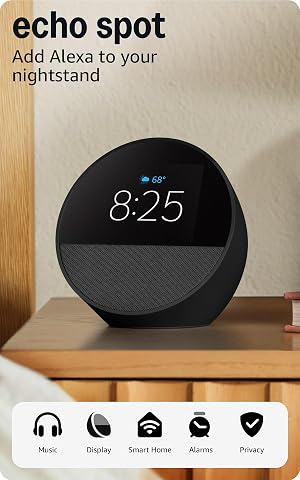
Amazon Echo Spot Smart Alarm Clock with Alexa, Black
- ✔ Display: 2.83-inch touchscreen, 240 × 320 pixels
- ✔ Camera: None
- ✔ Speaker: 1.73-inch full-range built-in speaker
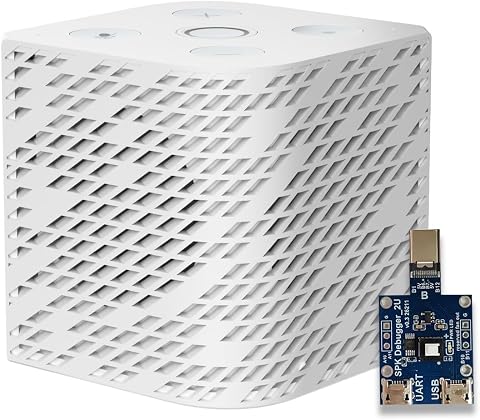
Third Reality Voice/Music Assistant Dev Edition for Home Assistant
- ✔ Operating system: Linux
- ✔ Processor: Quad-core ARM A53
- ✔ Memory and storage: 256 MB RAM; 512 MB flash
That difference matters most when you are building a home around products from several brands or want to customize routines. Choose Alexa if compatibility and flexibility are priorities. Choose Google Assistant if your household relies on Android, Google Calendar, Maps, or other Google services and you want voice control to feel connected to them. Neither is the universal winner: the best choice depends on your existing devices and the jobs you expect the assistant to handle.
At a Glance
| Criteria | Amazon Alexa | Google Assistant | Winner |
|---|---|---|---|
| Compatible devices | Broad support across many smart home brands and device categories; check each product’s current compatibility. | Supports major smart home categories and many brands, though some devices or features may be Alexa-only. | A |
| Voice control and answers | Handles common commands well; performance depends on the device, setup, and request. | Strong at conversational queries and requests tied to Google services; results can vary by device and account. | Depends |
| Routines and customization | Flexible routines and a large catalog of add-ons, with more options for tailoring behavior. | Supports useful routines, though the available triggers and controls may differ from Alexa’s. | A |
| Google and phone integration | Works with Google services and Android, but is centered on Amazon’s ecosystem. | Strong fit for Android and Google services such as Calendar and Maps, subject to account and device settings. | B |
| Privacy and household controls | Offers voice history controls and household settings; privacy choices vary by device and feature. | Offers activity controls and device settings; available controls vary across products and account features. | Depends |
| Hardware and ongoing cost | Many Echo models at different prices, with optional paid services and device costs. | Google devices span several price points; smart home hardware and optional services add to total cost. | Depends |
Amazon Echo Show 5 Smart Display, Charcoal
The Echo Show 5 is our best overall pick because it gives Alexa a useful visual interface without asking the buyer to assemble a Home Assistant setup. Its 5.5-inch touchscreen can show information and smart-home controls at a glance, while the 2 MP camera supports video calls and viewing compatible cameras. That combination makes it more adaptable than the Echo Spot, whose smaller screen is oriented around the time and bedside information.As a voice assistant, the Show 5’s main advantage is that it can handle several roles from one compact device: voice interaction, smart-home controls, calls, and media playback. The camera shutter and microphone and camera-off button give us physical privacy controls when the device is in a shared space. The recycled materials in its fabric, aluminum, and packaging are an additional consideration for buyers comparing hardware choices.There are boundaries to that flexibility. Alexa skills and some services may require subscriptions or other fees, and the device does not support ad-hoc or peer-to-peer Wi-Fi networks. It is also larger and more camera-forward than the Spot, so it is not the simplest choice for a bedroom where a clock and voice control are enough. Compared with Third Reality, it offers a more self-contained Alexa experience, while Home Assistant users may prefer the latter’s platform-specific design and editing options.
Pros:
- Alexa voice control with a 5.5-inch touchscreen for visible information and smart-home controls.
- Camera enables video calls and viewing of compatible cameras.
- Built-in camera shutter and microphone/camera-off button provide physical privacy controls.
- Recycled fabric and aluminum, plus recyclable packaging.
Cons:
- Some Alexa skills and services may require subscriptions or other fees.
- Does not support ad-hoc or peer-to-peer Wi-Fi networks.
- Bluetooth speakers that require PIN codes are not supported.
Best for: Households that want an Alexa smart-home assistant with a visible touchscreen, video-call camera, and compatible camera viewing in one device.
Not ideal for: Buyers who want a Home Assistant-focused device, do not want a camera in the room, or need ad-hoc Wi-Fi support.
Bottom line: Choose the Echo Show 5 for the broadest mix of Alexa voice control, visual controls, and camera features in this lineup.
“Choose the Echo Show 5 for the broadest mix of Alexa voice control, visual controls, and camera features in this lineup.”
Amazon Echo Spot Smart Alarm Clock with Alexa, Black
The Echo Spot is the most focused option in this comparison: it brings Alexa voice control to a bedside clock with a small, customizable screen. The 2.83-inch display can show the time, weather, song titles, and reminders, making it more useful as a nightstand companion than a screen for video calls or broad visual controls. Unlike the Echo Show 5, it has no camera, which may suit buyers who want an assistant near the bed without a camera pointed into the room.Routines and compatible smart-home controls let the Spot do more than sound an alarm. Its speaker can play music, podcasts, and audiobooks, and Bluetooth supports audio streaming and voice control. A microphone-off button provides a straightforward privacy control. For an Alexa household, this compact format may be an easier fit than the larger Show 5 when the main jobs are checking the time, hearing a response, or triggering a routine.The tradeoff is its narrower display role. The Spot cannot make video calls or show compatible camera feeds, so the Show 5 is the better fit when a screen should double as a smart-home dashboard. Its eero Built-in feature can extend coverage with a compatible eero router, but the stated coverage is conditional and comes with device and performance limitations. Buyers should treat that as a supplementary capability rather than the main reason to choose it. It also does not support ad-hoc or peer-to-peer Wi-Fi.
Pros:
- Customizable screen displays time, weather, song titles, and reminders.
- Alexa voice control supports compatible smart-home devices and routines.
- Built-in speaker plays music, podcasts, and audiobooks.
- No camera; includes a microphone-off button and uses 36% recycled materials.
Cons:
- Small display is less suited to video calls or broad visual controls than the Echo Show 5.
- eero Built-in requires a compatible eero router and has device and performance limitations.
- Does not support ad-hoc or peer-to-peer Wi-Fi networks.
Best for: Alexa users who want a compact bedside assistant for alarms, routines, audio, and glanceable time or weather information.
Not ideal for: Buyers who need video calls, a larger visual smart-home interface, camera viewing, or a Home Assistant-specific device.
Bottom line: Pick the Echo Spot when an Alexa assistant should work primarily as a bedside clock, speaker, and routine trigger.
“Pick the Echo Spot when an Alexa assistant should work primarily as a bedside clock, speaker, and routine trigger.”
Third Reality Voice/Music Assistant Dev Edition for Home Assistant
Third Reality takes a different route from the two Alexa devices: it is designed for Home Assistant, with Home Assistant Voice Assistant and Music Assistant preloaded. Its dual digital microphones capture voice, while the built-in speaker handles text-to-speech, streamed music, and system audio. Bringing capture and playback together in one compact device makes it a practical room endpoint for a Home Assistant setup rather than a general-purpose smart display.This is the pick for buyers who want to build around Home Assistant and value the ability to work with the device itself. Firmware flashing, live logs, and on-device editing point toward a more configurable experience than the Echo Spot or Show 5 offers. The tradeoff is that the audio is processed through a Home Assistant host. That dependency means it is not as self-contained as an Alexa device; buyers need the host and should be comfortable managing the broader setup.Compared with the Echo Show 5, Third Reality gives up a touchscreen and camera, so it cannot serve as a visual control panel or video-call device. Compared with the Spot, it is less oriented around alarms and glanceable clock information. Its strengths are instead platform fit and developer flexibility. The 2.4 GHz-only Wi-Fi is a further constraint for network planning, and the supplied details do not describe a privacy shutter or microphone-off control. We would choose it for a Home Assistant room endpoint, not as the most accessible first voice assistant for a mixed-platform household.
Pros:
- Preloaded with Home Assistant Voice Assistant and Music Assistant.
- Combines dual digital microphones and a 3 W speaker for voice capture and audio playback.
- Supports firmware flashing, live logs, and on-device editing.
- Compact design suits use as a room-based Home Assistant endpoint.
Cons:
- Voice audio is processed through a Home Assistant host.
- Wi-Fi is limited to 2.4 GHz.
- No touchscreen or camera for visual controls or video calls.
Best for: Home Assistant users who want a compact voice-capture and audio-playback endpoint with firmware and on-device editing options.
Not ideal for: Buyers seeking a ready-made Alexa assistant, a screen or camera, or a device that processes voice without a Home Assistant host.
Bottom line: Choose Third Reality when Home Assistant integration and configurability matter more than an all-in-one Alexa display.
“Choose Third Reality when Home Assistant integration and configurability matter more than an all-in-one Alexa display.”
As an Amazon Associate we earn from qualifying purchases.
Key Differences
For a mixed-brand smart home, compatibility is often the practical starting point. Alexa has long offered broad support across a large range of connected products, which can make it easier to combine lights, plugs, locks, sensors, and appliances from different manufacturers. Google Assistant also supports many popular products, but a particular device or feature may work better with one platform than the other. Check the exact model and desired functions before buying; a logo on the box does not guarantee that every feature works by voice.
Once devices are connected, the assistants diverge in how they fit into daily life. Alexa provides more room for custom routines and add-ons, while Google Assistant is compelling for people who already use Android and Google services. Both can manage ordinary household commands, but voice recognition, available controls, and responses depend on the speaker, account setup, network, and connected device. Price alone does not settle the choice: the better value is the system that supports the devices you own and the routines you will actually use.
Detailed Comparison
Compatible devices (Amazon Alexa wins — moderate)
Alexa wins by a moderate margin for households mixing brands or shopping across many smart home categories. Its broad ecosystem makes it more likely that a device will offer voice control and routine support through Alexa. Google Assistant covers many mainstream products, but availability and feature depth can be uneven by model. In practice, verify compatibility for specific locks, thermostats, sensors, and appliances before committing; neither platform guarantees that every function on a connected device is exposed to voice control.
Voice control and answers (minor difference)
This is a close, request-dependent comparison. Both assistants can handle basic commands such as adjusting lights, setting timers, and controlling compatible devices. Google Assistant has an advantage when the question or request connects to Google services, while Alexa’s performance can be strong for straightforward smart home commands. The difference is usually minor for routine device control and more noticeable when you ask for information or account-linked actions. Results vary by speaker and software version.
Routines and customization (Amazon Alexa wins — moderate)
Alexa wins by a moderate margin for users who want to build and adjust multi-step routines. It offers a broad set of routines and add-ons, giving experienced users more ways to customize responses and automation. Google Assistant can run useful routines too, but the available triggers and controls may differ. For a simple “good night” routine, either can work; for a home with several devices and tailored conditions, Alexa is generally the more flexible place to start.
Google and phone integration (Google Assistant wins — moderate)
Google Assistant wins by a moderate margin if Android and Google services are already central to the household. Its fit with services such as Calendar and Maps can make voice requests feel more connected to everyday phone use, depending on permissions and account setup. Alexa can handle some connected services and phone tasks, but its center of gravity is Amazon’s ecosystem. If you rarely use Google services, this advantage may have little practical value.
Privacy and household controls (moderate difference)
Neither has a universal advantage. Both ecosystems provide settings for managing voice activity and device behavior, but controls vary across product models and features. A household should check microphone mute controls, voice history settings, account permissions, and how shared profiles work on the specific speaker it plans to use. This is a meaningful setup decision rather than a clear platform win: choose the device whose controls and account arrangements suit the people sharing the home.
Hardware and ongoing cost (moderate difference)
There is no consistent winner on value. Both brands offer speakers at different price points, and the cost of a working smart home usually includes compatible lights, plugs, locks, or other devices. A less expensive speaker is poor value if it cannot control the products you want. Compare the specific speaker and accessory prices available to you, and count any subscriptions or paid features you expect to use. Pay extra for stronger sound or a screen only if those features matter beyond basic voice control.
Amazon Alexa: Pros and Cons
Pros:
- Broad compatibility with smart home brands and product types.
- Flexible routines and a large add-on ecosystem.
- Echo speakers are available across a range of styles and prices.
Cons:
- Some routines and features require setup in the Alexa app or an add-on.
- The Amazon-centered ecosystem may be less convenient for Google-first households.
- Compatibility with a platform does not always include every feature of a device.
Google Assistant: Pros and Cons
Pros:
- A natural fit for households using Android and Google services.
- Handles common smart home commands and mainstream devices.
- Useful when voice requests connect to existing Google accounts and services.
Cons:
- Device support and feature depth can vary by product.
- May offer less room for customization than Alexa for some routines and add-ons.
- Its service integration is less valuable to households that do not use Google products.
Who Should Choose What
Choose Amazon Alexa if:
- You have devices from several brands and want the broadest chance of bringing them under one voice system.
- You plan to build detailed routines or use Alexa-compatible add-ons.
- Your household already uses Echo devices or Amazon services and prefers to extend that setup.
Choose Google Assistant if:
- Most household members use Android phones or Google services such as Calendar and Maps.
- You value connected requests that draw on your Google accounts and daily phone use.
- Your existing smart devices work with Google Assistant and your routines are relatively straightforward.
Skip both if: Skip both as a deciding hub if your most important devices do not support either platform, or if you want local control without relying on cloud-connected voice services. Check whether your devices support a compatible local hub or standard before buying a speaker.
Value for Money
Paying more for a speaker is worthwhile when you will use what the extra hardware adds, such as better sound or a display for visual information. For voice control alone, a basic model may be enough; the more important cost is often the compatible smart home equipment you will add over time. Alexa can be the better value if its broader device support lets you use products you already own or find affordable. Google Assistant can be the better value if it works smoothly with your Android and Google setup, saving you from buying into an ecosystem that does not fit your habits. Compare the whole setup, including any optional subscriptions, instead of judging by speaker price alone.
Final Verdict
For most people building a mixed-brand smart home, start with Amazon Alexa. Its wider device ecosystem and flexible routines make it the safer default when compatibility and customization lead the decision. Choose Google Assistant if your household is already built around Android and Google services and your priority is connecting voice requests to that existing setup. The biggest deciding factor is the devices and accounts you already use: check those before buying, and pay more only for hardware features you will use regularly.
Frequently Asked Questions
Can Alexa and Google Assistant control the same smart home devices?
Many popular devices support both, but support can vary by model and feature. A device may allow basic voice commands on both platforms while exposing extra controls or routines on only one. Check the product’s compatibility details for the functions you need.
Which assistant is better for a home with devices from different brands?
Alexa is generally the stronger starting point for a mixed-brand setup because its device ecosystem is broad. Still, confirm support for each important product, especially locks, thermostats, and sensors, before choosing the hub.
Is Google Assistant better for Android users?
Often, yes. Google Assistant fits more naturally with Android and Google services, which can help when you want voice requests tied to your accounts. The advantage depends on which services and permissions you use; it does not automatically make every smart home device work better.
Should I buy the more expensive smart speaker?
Only if you will use its added features, such as improved audio or a screen. For basic voice control, a less expensive speaker may be sufficient. Spend time checking device compatibility and the total cost of the lights, plugs, and other products you plan to connect.