This checklist is for homeowners who want to keep essential devices and household systems powered when the usual supply is unavailable. It covers portable power, solar charging, surge protection, battery backup, emergency communication, and automatic transfer equipment, with practical buying considerations for each slot.

Get home appliances delivered free with Prime
- Fast, free delivery on millions of items
- Prime Video, Amazon Music and more included
- Member-only deals all year
The sections follow the roles these options can play: storing and supplying power, replenishing it, protecting electrical equipment, and staying informed. One section offers advice rather than a named product. The listed product names are starting points for comparison; their names alone do not establish performance or compatibility. Check specifications before deciding.
Use the checklist to identify what you need to power, how long you need it, and which equipment must work together. Confirm the exact model details, installation requirements, and compatibility with your home and devices before buying. For permanently connected electrical equipment, ask a qualified electrician to assess the setup. Plan around your needs rather than choosing by category alone.
Portable power station
A portable power station can be a useful checklist slot when you want a unit intended to store and supply power. The listed pick is the Jackery HomePower 3600 Plus Portable Power Station, 3584Wh, 3600W. Treat those figures as product-name details to verify against the exact model documentation, then compare them with the devices you expect to run. Start with your essential loads: list each device, its power needs, and how often or how long you expect to use it.
A common mistake is focusing on a capacity or output figure without checking whether the station supports the device’s connection and operating requirements. Check the available outlets, charging inputs, operating limits, and any stated conditions that affect usable power. Consider where the unit will sit, how you will move it, and how you will recharge it during an outage. Confirm the connections and recharge plan before treating it as a household backup.
Compatibility matters if you plan to pair the station with solar panels or other equipment: confirm supported input specifications and connectors for the exact versions. Do not assume a product name establishes what is included. Verify the complete configuration and whether it suits your priority devices.
What to look for:
- Compare stated capacity and output with the needs of priority devices.
- Check outlet types and device connection requirements.
- Verify charging inputs, supported panels, and connector compatibility.
- Confirm dimensions, weight, and where the unit will be stored.
- Check exactly what is included in the selected configuration.
Jackery HomePower 3600 Plus Portable Power Station, 3584Wh, 3600W

The Jackery HomePower 3600 Plus is a 3584Wh power station with 3600W output and expandable capacity. It supports AC, solar, gas generator, and hybrid charging, and features LFP battery cells, a wheeled luggage-style design, and a telescopic handle for portability.
Pros:
- High 3600W output, with support for 7200W in parallel
- Expandable capacity and multiple charging options
- LFP cells are described as having 6000 cycles and a 10-year lifespan
- Wheels and a telescopic handle make it easier to move
Cons:
- Weighs 77.2 pounds
- 240V output requires parallel operation
- Solar panel is optional
Best for: Households comparing a portable station for selected devices
Not ideal for: Shoppers who need a confirmed whole-home setup from the product name alone
Bottom line: Match the station’s verified specifications and connections to your priority devices before choosing it.
Solar generator panel
Solar panels can be part of a backup plan when you want to recharge compatible equipment using sunlight. The listed pick is the OSCAL PowerMax 6000 Solar Generator with 3×400W Solar Panels, 6000W Pe. The product name includes a truncated ending, so confirm the full model name and exact package contents before comparing it. Check the full listing to establish which generator and panels are actually included.
A common buying mistake is assuming panels will connect to a generator just because they are presented together in a product name. Verify the generator’s supported solar input, panel electrical specifications, connectors, and any limits on the number of panels or configuration. Also consider where panels could be placed and whether the arrangement fits your available space and intended use. Confirm system compatibility using documentation for the exact products.
Look at how the generator stores and supplies energy as well as how the panels recharge it; the name alone does not establish runtime or charging conditions. If you already own equipment, compare its specifications and connectors with the listed set. Build around the devices you need to keep powered, and verify that the complete setup supports them.
What to look for:
- Confirm the complete model name and package contents.
- Compare the generator’s solar input limits with panel specifications.
- Check connectors and supported panel configurations.
- Consider available placement space and the intended setup.
- Verify output connections against the devices you plan to power.
OSCAL PowerMax 6000 Solar Generator with 3×400W Solar Panels, 6000W Peak, 120V/2

The OSCAL PowerMax 6000 is a portable solar generator with a 3600Wh capacity, supporting 6000W continuous power and 9000W surge. It features fast charging, long-lasting LiFePO4 batteries, and automatic switchover for uninterrupted power, making it suitable for emergencies, outdoor activities, and home backup.
Pros:
- High-capacity 3600Wh battery with long lifespan
- Supports both 120V and 240V outlets for versatile use
- Fast charging capability reduces downtime
- Automatic switchover ensures continuous power during outages
Cons:
- Heavy weight (45.5 kg), less portable for some users
- Higher price point may be a barrier for budget-conscious buyers
- Requires solar panels and setup knowledge for optimal use
Best for: Shoppers evaluating a generator and panel package together
Not ideal for: Buyers who have not confirmed the truncated product listing
Bottom line: Verify the complete listing and match panel and generator specifications before purchase.
Whole home surge protector
A whole-house surge protection device is a checklist item for people considering protection at the home electrical system level. The listed pick is the Siemens Boltshield FSPD140 Level 2 Whole-House Surge Protection Device. Product naming does not confirm fit with a particular electrical panel or installation conditions. Check your panel details and the device documentation before deciding whether this is the right category and model for your home.
A common mistake is treating a device labeled for whole-house protection as a simple plug-in accessory. Confirm the required installation method, electrical ratings, compatibility requirements, and any panel or service conditions specified by the manufacturer. Since this equipment connects to household wiring, have a qualified electrician review the installation and determine whether the product fits the existing system. Get a compatibility review before purchasing or planning installation.
Compare the exact model’s documentation with your electrical setup, including any requirements for placement or connection. Do not infer protective coverage or performance from the product name alone. If you are also planning backup equipment, ask how the proposed equipment and surge protection relate within your system. Coordinate the electrical plan with a professional who can assess the home.
What to look for:
- Verify panel and service compatibility in the product documentation.
- Check installation method and electrical requirements.
- Confirm the exact model and included components.
- Ask a qualified electrician to assess fit and installation.
- Coordinate with any planned backup-power equipment.
Siemens Boltshield FSPD140 Level 2 Whole-House Surge Protection Device, 140 kA,

This whole-house surge protection device is rated for 140 kA and protects against externally and internally generated surges. It has thermally protected MOVs, diagnostic monitoring, and a red status indicator with an audible alarm to signal when replacement is needed.
Pros:
- Provides 140 kA surge current protection for the whole home.
- Visual indicator and audible alarm signal when replacement is needed.
- Type 4 enclosure allows outdoor installation.
- Thermally protected MOVs and diagnostic monitoring.
Cons:
- Requires external parallel connection next to electrical gear.
- The audible alarm may be undesirable in some installation locations.
Best for: Homeowners reviewing a whole-house surge protection option
Not ideal for: Anyone seeking a simple plug-in device or unreviewed installation
Bottom line: Have an electrician confirm the device matches your panel and installation requirements.
Smart battery backup
For this slot, choose based on the devices and systems you want a battery backup to support; no specific product is named. Start by listing what must stay on, how long you expect to need backup, and which devices can be left off. Define your essential loads before comparing battery options, so capacity and output requirements come from your actual use.
A common mistake is choosing a battery without checking its output, connection types, charging method, and compatibility with the equipment it is meant to support. For network devices, appliances, or other electronics, verify each item’s power requirements and whether the backup system supports them. Consider where the battery will be placed and how you will recharge it if an outage continues. Check every connection and operating requirement against the manufacturer’s documentation.
If you intend to connect a battery system to home wiring or use it alongside a generator, have a qualified professional review the system and required equipment. Do not assume separate products work together because they share a general category. Confirm the complete setup, including any transfer equipment and installation needs, before purchasing.
What to look for:
- List priority devices and their power requirements.
- Compare capacity and output with the intended runtime and loads.
- Verify outlets, connectors, and charging methods.
- Check compatibility with any generator or solar equipment.
- Get professional guidance for connections to household wiring.
Emergency radio charger
An emergency radio charger can combine a way to receive information with charging features, according to the category and product name. The listed pick is the Emergency Weather Radio with Large Solar Panel, Real 12000mAh Battery. Verify the complete product details and supported functions rather than assuming every feature or use case from the name. Check the exact features that matter for your emergency plan.
A common mistake is treating a stated battery capacity or solar panel as proof of how the device will perform in a particular situation. Review the manufacturer’s operating instructions, charging methods, ports, supported devices, and conditions for solar charging. Confirm that the radio functions and alerts meet your needs, and learn how to operate it before an emergency. Read the operating details and check whether your devices can use its charging connections.
Think through storage and readiness: choose a place where you can find it, and follow the instructions for maintaining its charge and using its power options. If you plan to charge a phone or another device, verify connector and charging compatibility for that exact device. Check the full setup before relying on it as part of an emergency kit.
What to look for:
- Verify radio features and alert functions in the documentation.
- Check charging ports and compatibility with intended devices.
- Review battery and solar charging instructions.
- Confirm the full product details and included accessories.
- Keep the device accessible and follow its maintenance guidance.
Emergency Weather Radio with Large Solar Panel, Real 12000mAh Battery
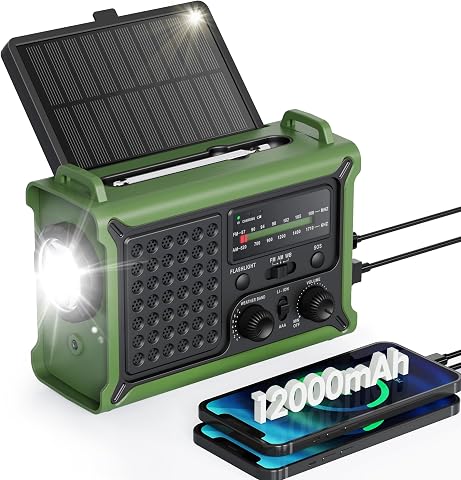
This rugged emergency weather radio features a large 8500 mm² monocrystalline solar panel and a genuine 12,000 mAh battery for reliable power during blackouts or outdoor adventures. It offers multiple charging options—including solar, hand crank, USB‑C and AAA batteries—along with NOAA alerts, a loud SOS alarm, a 5W adjustable flashlight and a 12‑LED reading lamp.
Pros:
- Large 8500 mm² solar panel provides fast, efficient charging.
- Real 12,000 mAh battery delivers dependable power for phones and lights.
- Multiple charging options (solar, hand crank, USB‑C, AAA) ensure versatility in emergencies.
- Dual lighting system with a powerful 5W flashlight and a 12‑LED reading lamp.
Cons:
- Requires three AAA batteries in addition to the built‑in battery, adding extra maintenance.
- Hand crank can become tiring if used for extended periods.
- The combination of a large solar panel and high‑capacity battery makes the unit relatively bulky.
Best for: People comparing a radio and charger for an emergency kit
Not ideal for: Buyers who need confirmed device compatibility without checking specifications
Bottom line: Verify radio functions and charging compatibility for the devices you intend to use.
Automatic transfer switch
An automatic transfer switch is a key planning item when backup equipment is intended to supply household circuits. The listed pick is the Generac 14 kW Whole-Home Standby Generator with 200-Amp Transfer Switc; the name appears truncated, so confirm the full product name and configuration. Verify the exact package and do not assume the listing alone establishes suitability for your home.
A common mistake is assuming a generator and transfer switch will fit an existing electrical system without an assessment. Check the manufacturer’s documentation for supported equipment, electrical requirements, installation conditions, and what the package includes. Determine which circuits or loads are intended to receive backup power and whether that plan fits the specified system. Have a qualified installer review the setup before selecting equipment or planning connections.
Confirm site requirements and any local rules that apply to installation, then coordinate generator and transfer equipment as one system. Product-name ratings do not establish actual performance for your household or compatibility with your panel. Ask the installer to explain the proposed configuration and verify each component against the exact model documentation. Review the complete system plan before moving forward.
What to look for:
- Confirm the full product name and package contents.
- Verify generator and transfer switch compatibility in documentation.
- Identify the household loads and circuits the system is intended to support.
- Have a qualified installer assess the electrical system and site.
- Check applicable local installation requirements.
Generac 14 kW Whole-Home Standby Generator with 200-Amp Transfer Switch and Cell

This 14 kW standby generator automatically detects a power outage and supplies backup power to a home, running on an existing natural gas or liquid propane fuel supply. Built-in cellular connectivity supports remote monitoring and control through the Mobile Link app, while oil-level sensors and cold-start improvements help support reliable operation.
Pros:
- Automatically detects outages and starts to provide home backup power.
- Supports natural gas and liquid propane fuel supplies.
- Built-in cellular connectivity enables remote monitoring, control, and maintenance alerts.
- Oil-level sensors and cold-start improvements support generator readiness.
Cons:
- Mobile Link premium subscription is required for the app’s remote features.
- At 391 pounds, the generator is heavy and requires substantial installation planning.
Best for: Homeowners considering standby equipment and automatic transfer
Not ideal for: People seeking a portable, do-it-yourself backup option
Bottom line: Confirm the complete model and have a qualified installer assess system compatibility.
Set your buying order by what matters most in your home: first identify essential devices and electrical needs, then compare the backup option that fits those loads. Check connections and recharge methods next, and confirm any panel or transfer equipment with an electrician. Prioritize compatibility and installation needs before filling out the rest of the plan.
You do not need to choose every category at once. Work through the checklist, verify the details for each exact model, and build a setup that matches your household’s priorities. A clear plan makes comparison easier and helps you choose with confidence.