
TL;DR
Smart home security cameras use a lens, image sensor, and software to capture video and notify users about activity; some record continuously, while others save clips when they detect motion. Before buying, compare indoor or outdoor ratings, power and Wi-Fi needs, night performance, alert accuracy, storage fees, privacy controls, and smart home compatibility. Good placement and account security matter as much as the camera itself.
A 4K camera can record a sharp picture of the wrong patch of driveway. That is the quiet surprise of smart home security cameras: the number on the box matters less if the lens points into glare, the Wi-Fi drops out, or the camera misses the moment someone reaches your door.

Get home appliances delivered free with Prime
- Fast, free delivery on millions of items
- Prime Video, Amazon Music and more included
- Member-only deals all year
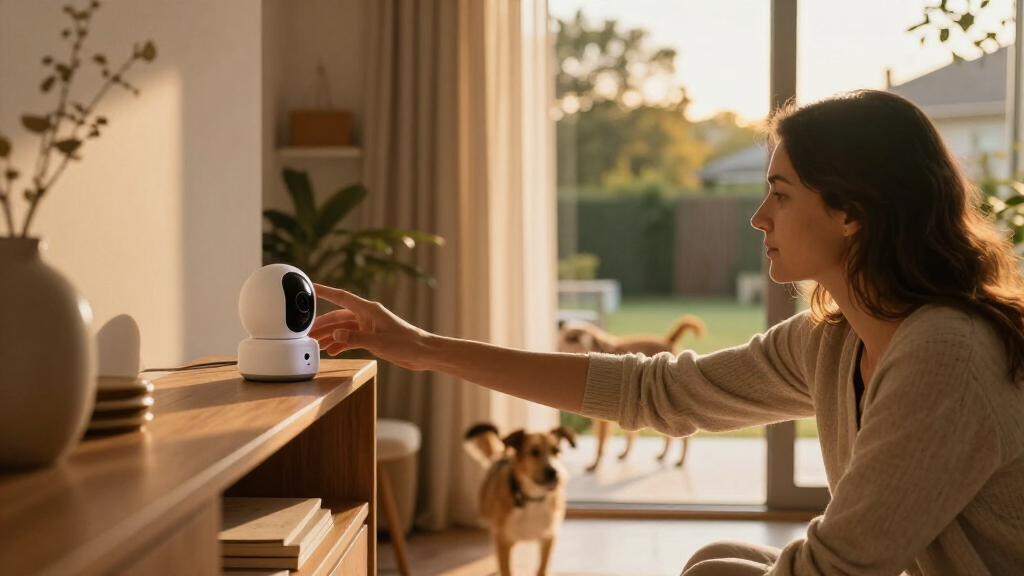
These devices use a lens, image sensor, and software to capture video and send alerts when they detect activity. Depending on the model, they may record continuously or save short clips when motion occurs. Many connect to a phone app and can work with displays, lights, doorbells, and alarm systems.
This guide gives you the key facts for choosing and using a camera: where to place it, what video and alerts can tell you, how storage plans work, and which privacy habits protect your household. You will also see why a camera is one part of smart home security, not a substitute for good locks, lighting, and sensible routines.
Choose camera placement and outdoor ratings for the actual location, weather, power access, and rules that apply where you live.
Compare field of view, night performance, glare, and placement along with resolution; the highest resolution does not guarantee a useful image.
Check alert accuracy and which detection features require a subscription before relying on people, pet, or package labels.
Find out where footage is stored, how long it lasts, and what you lose if a cloud plan ends or the internet goes down.
Secure the account with a unique password and multifactor authentication, then limit camera views and recording access.
Know What a Smart Camera Can—and Can’t—See
A smart home security camera records video and uses software to alert you when it detects activity, but it only shows the scene inside its view and during its recording window. It cannot guarantee that an event will be recognized, captured clearly, or reported while your network or power is down. That boundary matters when deciding what job to give it: a camera may help you review a delivery, but it is not a complete record of everyone who approached the house.
Think of the camera as a window with a memory. A wide-angle lens may show your porch and gate at once, while a narrower view can make a face or package easier to see close up. The tradeoff is coverage versus detail: the wider view reduces blind spots, but spreads the image across more of the scene. Even high resolution cannot recover detail hidden by a bright porch light, a raindrop on the lens, or a fast-moving person blurred across the frame.
For example, a renter who points a camera through a glass patio door may see reflections of the living room at night instead of the garden. Moving it outside, if the model is rated for outdoor use and the lease allows it, can solve the reflection problem. A small indoor camera aimed at the entryway may be a better fit if outdoor mounting is not allowed. Each choice changes what the camera can reliably answer: the outdoor view may show an approach more clearly, while the indoor view avoids mounting restrictions but sees only what happens after someone enters.
Some cameras record continuously; many battery models rely on motion-triggered clips to conserve power. Continuous recording can preserve the lead-up to an event, including an approach that begins outside a motion zone, but it uses more power, storage, and network capacity. Event clips reduce those demands, but depend on detection working and may omit the seconds before a person enters the frame. Choose the recording style around the question you want the camera to answer and how much footage you are willing to manage.
A camera can show you what happened in its frame. It cannot promise a complete account of what happened around your home.
Products Worth Considering

Ring Wired Doorbell Pro (2021 Release), Satin Nickel

Sonos Arc Ultra Soundbar with Dolby Atmos, Black

Dyson Ball Animal 3 Upright Corded Vacuum
As an affiliate, we earn on qualifying purchases.
Match the Camera to the Spot You Want to Watch
Choose an indoor or outdoor camera according to its location, power access, and expected weather, then place it where the view stays clear and the connection stays reliable. Outdoor models need weather protection and may handle wider temperature swings; indoor models are often smaller and may offer shutters or recording-off controls. A mismatch can make an otherwise capable camera unreliable: weather can damage an indoor model, while an outdoor unit inside may add cost or features you do not need.
Imagine watching a front walk in a cold, wet winter. An outdoor-rated camera with a secure mounting bracket may suit that job better than a compact indoor unit tucked behind a window, where glass glare can wash out the image after dark. For a shared indoor space, a visible camera with a physical shutter can make it clear when recording stops. The right mounting point also affects maintenance and footage: too high can make faces hard to recognize, while a spot that is difficult to reach makes charging, cleaning, or adjusting the lens less convenient.
Power shapes where you can mount the device. A plug-in camera needs an outlet nearby, while a battery model gives you more placement freedom but may record less often and need charging. Solar-assisted options can reduce charging in some locations, though shade, short winter days, and camera use affect how well they work. The practical choice is a balance between installation effort and upkeep: a fixed power source may constrain the angle, while a battery lets you choose a better view at the cost of periodic charging and possible recording limits.
Before drilling, check the camera’s mounting instructions, your lease or building rules, and local requirements for recording video or audio. Avoid aiming into a neighbor’s windows or capturing public space unnecessarily. For a typical home, an entryway view that includes faces at the door and the path leading to it often tells you more than a high camera pointed at the entire street. A focused frame can make alerts more relevant and preserve detail where it is useful, while a broad frame may include extra movement that creates noise without helping answer your main question.
- Entryway: Frame the approach and door without filming private neighboring spaces.
- Driveway: Check night lighting, vehicle glare, and how far away useful details need to be.
- Shared indoor area: Tell household members and guests about recording, and use privacy controls when appropriate.
Judge Video Quality by the Scene, Not the Box
To judge camera video quality, consider resolution alongside field of view, night performance, glare handling, motion blur, and placement. Those factors determine whether you can distinguish a person, parcel, or car in the actual scene your camera records. This is why a specification is only a starting point: the same camera can produce useful footage at a well-lit doorway and vague footage across a dark driveway.
Resolution is like the size of a canvas: a larger one gives the image room for detail, but it cannot fix poor lighting or a badly chosen angle. A camera showing a broad driveway may cover more ground, while a tighter view of the porch may make a delivery label or face more recognizable. Decide which details matter before you compare specifications. If you need to see whether someone reached the door, a clear, close view can be more valuable than a high-resolution image that includes the whole yard but renders the visitor small.
Night vision also varies. Infrared mode may show a black-and-white scene, while color night vision may need some light from a porch lamp or street. If a headlight shines straight at the lens, either type can lose detail in the glare. A quick evening check can reveal this: stand where a visitor would stand and look at the live feed while someone walks through the frame. That check shows whether the camera retains a recognizable face as lighting changes, rather than merely whether the feed looks bright.
Distance matters too. A camera high under the eaves can survey a large area, but it may show the top of a visitor’s head rather than their face. If a package is left beside the door, a second, closer view might be more useful than upgrading the main camera’s resolution. The best result comes from a clear line of sight, a useful angle, and enough light. Additional cameras add cost and more footage to manage, so first consider whether repositioning the existing one can cover the detail you need.
For example, a homeowner comparing two cameras for a shadowy side gate should test their night views there, rather than choosing from daytime sample images. A shorter field of view with better low-light detail may answer “who opened the gate?” better than a wider, higher-resolution picture of the fence. Testing in the actual spot also exposes practical problems, such as a motion light washing out the image or a tree branch obscuring the view when it moves.
Choose Alerts That Tell You What Needs Attention
Useful camera alerts distinguish events you care about from routine movement, but no detection feature is perfectly reliable. Basic motion alerts can fire for tree shadows, passing headlights, or every pet crossing the room; people, pet, vehicle, or package labels can narrow the noise, depending on the device and its software. The value is not just fewer notifications: it is a better chance that you will notice and act on the ones that matter. Overly frequent alerts can train you to ignore them, while overly narrow settings can leave meaningful activity unnoticed.
Some newer cameras classify activity on the device or a home hub, while others rely more on cloud services. On-device processing can reduce the need to upload some video, but the actual data handling depends on the product. Check which features work without a subscription, whether the camera sends audio, and what information its app shares. Cloud processing may enable features that are more demanding, but it also means understanding the service’s handling of recordings and whether those features stop when a plan ends.
Consider a family with a dog that naps beside the back door. A basic motion alert may buzz all afternoon as the dog shifts in its bed. A pet-aware alert or a smaller activity zone might reduce interruptions, while keeping a separate zone over the gate. But if the person-detection feature is inaccurate at night, you may still need to review clips manually. Reducing alerts therefore involves a tradeoff: tighter zones and classifications can make the phone quieter, but they also make it important to check that the camera still covers the approach you care about.
Set detection zones around the event you want to know about, then adjust sensitivity after living with the camera for a week. If alerts arrive every time a car passes the end of your driveway, tighten the zone. If a delivery person walks through without triggering a notice, expand it or check whether the camera’s angle blocks the approach. A short period of review helps you distinguish a settings problem from a placement or lighting problem, so you can fix the cause instead of simply turning alerts off.
- Start with alerts for the places and hours that matter to you.
- Use activity zones to exclude sidewalks, trees, or busy roads where possible.
- Review missed events and false alerts before relying on classifications as proof.
Compare Storage Plans Before You Commit
Camera footage may live on a memory card, a home hub, a cloud service, or a mix of those options. Local storage can avoid a recurring cloud fee, while a subscription may add longer video history, richer alerts, or easier sharing; the exact features depend on the model and plan. Storage determines more than where files sit: it affects how long you can investigate an event, whether clips are available away from home, and what happens if equipment or internet service fails.
Before you buy, check how long clips remain available, how many cameras a plan covers, and what happens to stored video if you cancel. A camera that lets you watch live video for free may still require a plan to review last Tuesday’s delivery. That distinction matters when you want evidence after returning from a trip. A short retention period may be enough if you check alerts daily, but it can leave a gap if you only discover a problem days later.
Picture a power or internet outage during a storm. A battery camera with local storage might keep recording if the device and storage stay powered, but remote viewing and phone notifications may stop without a working connection. A cloud-only setup may have different gaps. Read the outage behavior in the product details rather than assuming that “smart” means always connected. Local storage can preserve nearby footage during a connection failure, but it may be lost if the camera is stolen or damaged; cloud storage can keep remote copies, but depends on the camera being able to upload them.
Several cameras can also increase network use and storage demand. Resolution, compression, recording schedule, and whether video is constantly uploaded all affect the load. If you have a busy household Wi-Fi network, begin with one camera and check whether live viewing or uploads interfere with video calls before adding devices around the house. More cameras can reduce blind spots, but they also multiply storage costs and the volume of footage you may need to review.
| Storage choice | What it can offer | What to check |
|---|---|---|
| Memory card or camera storage | Local clip access without a cloud plan on some models | Storage capacity, overwrite behavior, and theft or device failure |
| Home hub | Central storage for compatible cameras | Hub power, network needs, and camera compatibility |
| Cloud plan | Remote history, sharing, or added alert features | Monthly cost, retention period, cancellation terms, and account access |
Protect Your Privacy and Keep Your Account Secure
Protect camera footage by securing the account, limiting who can view recordings, and choosing when the camera records. Internet-connected cameras can face account or device risks, so use a unique password, enable multifactor authentication when available, install software updates, and protect the home Wi-Fi network. These steps address different ways access can be exposed: a unique password limits damage from reused credentials, multifactor authentication adds another barrier, and updates can fix known software weaknesses.
Think about what the lens can see and hear before you mount it. An indoor camera may pick up a family conversation or a guest changing clothes if it points into the wrong room. A physical shutter, recording schedule, or app control can help you turn it off during private moments, but household members should know how and when the camera operates. A camera that is technically secure can still feel intrusive if people do not know when it is recording, so clear expectations are part of responsible setup.
For example, you might set a living-room camera to record only when everyone leaves, then disable it during the evening. If your app supports shared users, give access only to people who need it and remove old accounts after a housemate moves out. Review the device’s sharing settings and recording retention so old clips do not remain available longer than you intend. Limiting access also reduces the chance that an old or unnecessary account becomes an overlooked route to private footage.
Local rules for audio and video recording vary by location and circumstance. Before recording conversations, shared spaces, tenants, workers, or public areas, check the rules that apply where you live. Good security includes respecting the privacy of the people around the camera, not just keeping strangers out of your account.
Make privacy a setup habit: secure the account, aim carefully, tell household members, and check who can access saved footage.
Use Cameras as One Part of a Practical Home Security Plan
Smart home security works best when a camera adds visibility to other sensible protections, such as working locks, outdoor lights, and a clear plan for responding to alerts. A camera can record an event or notify you about activity, but a notification alone does not stop someone from entering or guarantee that help arrives. The camera’s role is to improve awareness; physical protections and a response plan address what happens next.
Smart home compatibility can make a setup easier to use. A camera may show a live view on a smart display, activate a light when motion occurs, or connect with a doorbell or alarm. Support varies by model and region, so confirm that the exact camera works with the platform you use. A label mentioning a voice assistant does not always mean every feature works through it. Compatibility can shape the whole routine: an alert that opens a useful view or turns on a light may save steps, while a partial integration may leave you switching between apps.
Imagine getting an alert while you are at work. A camera view may help you decide whether a parcel was delivered or a family member came home, while a porch light automation may improve visibility after dark. Set an automation that fits your routine and test it before relying on it; a light that switches on every time a passing car triggers motion can irritate neighbors and drain attention. The goal is a response that provides useful context without creating so many interruptions that you stop paying attention.
Before choosing a system, write down the main job you want it to do: watch a front step, check on a pet, or see who entered a garage. Compare power, connectivity, video and night performance, alert features, storage costs, privacy controls, compatibility, and warranty against that job. Then test the live view from the places you actually use the camera. The useful setup is the one that gives you clear, relevant information without turning your phone into a constant alarm bell.
Frequently Asked Questions
Do smart home security cameras need Wi-Fi?
Most use Wi-Fi for app access, remote viewing, and phone alerts. Some can record to local storage during an internet outage, but remote features may stop; check the model’s outage behavior before you rely on it.
Can I use a security camera without a subscription?
Sometimes. A camera may offer live viewing or local recording without a plan, while cloud history, longer retention, or advanced alerts may require a subscription. Check what remains available if you cancel.
Do smart cameras record all the time?
Some models support continuous recording, while many cameras save clips only when they detect activity. Battery-powered models commonly use event recording to conserve power, so they may not capture every moment between alerts.
Can smart home security cameras be hacked?
Any internet-connected device can face security risks, but good account habits reduce exposure. Use a unique password, turn on multifactor authentication when available, install updates, and remove access for people who no longer need it.
Will a camera recognize people, pets, or packages?
Some cameras classify these events, but accuracy varies with the model, lighting, angle, and activity. Features may require a subscription or on-device processing, and labels can still be wrong or miss an event.
Conclusion
Choose a camera for the scene you need to see, then check its power, connection, alerts, storage, and privacy controls before you mount it. A well-placed camera with a useful night view and manageable alerts can give you a clearer picture of home activity than a more expensive device aimed at the wrong spot.
Walk through the camera’s view as if you were a visitor. If you can see the path, the face, and the moment that matters, you have turned a lens into a useful window—one that still respects the people on the other side of it.